
Outlook – Read Receipts
One of the top 10 email annoyances is definitely the request to send a read receipt. With a single setting, you can get rid of it forever.
Sometimes, the sender wants to know if the recipient has actually read the message in time. Fortunately, read receipt requests in Microsoft Outlook are easy to disable. By default, Outlook prompts you to send a read receipt. Maybe you don’t want that at all, or perhaps it’s just a source of irritation.
If it’s really necessary for the sender to receive a confirmation, you can simply respond manually.
“I have received your email dated [date] regarding [subject].”
But for all the other times you receive automated read receipt requests, they can easily be turned off.
The read receipt settings consist of the following parts:
- Settings for how to handle incoming requests
- Settings for messages you send yourself
How to disable read receipts in Outlook
- Open Microsoft Outlook
- Go to Tools >> Options
- Select the Preferences tab

- Under the Email section, click >> Email Options

- Under Message Handling, click >> Tracking Options
- The settings window will appear
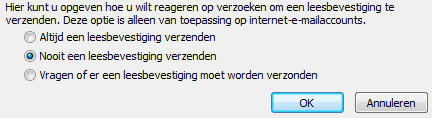
- In the last section of the window, you can configure how to handle incoming read receipt requests
- Select >> Never send a read receipt
- Set your preferences and click >> OK (3 times)
Always send a read receipt
If you enable this option, keep in mind that it might come across negatively to recipients.
Never send a read receipt
By selecting this option, no read receipt will ever be sent. Regardless of the sender’s settings, Outlook won’t respond.
Ask each time whether to send a read receipt
This setting offers the most flexibility. However, if you send many emails, it can become annoying, as Outlook will ask every time if a read receipt should be sent.
Requesting a read receipt yourself
We include this option for completeness, but we recommend not using it. A read receipt only confirms the message was opened—not that it was read or understood.
Risk of Outlook’s reading pane
If you use the reading pane in Outlook, emails may appear as opened even if they weren’t truly read. This can give the sender the wrong impression.