
Emergency Numbers (ICE) Always Accessible on Your Phone
Emergency services often encounter situations where a patient has a phone but the contact person cannot be reached. Usually, the phone is locked or ICE is not set up. Too bad, because the solution is very simple.
What is ICE
ICE is an international abbreviation for In Case of Emergency. The idea is to create a contact in your phone named ICE so someone knows who to call in case of an emergency.
Of course, you can add multiple contacts. Name them ICE1, ICE2, etc., and follow the order of importance. For example, ICE1 for your partner, ICE2 for your parents.
Phone Locked
Most phones are locked and can only be accessed with a password. This makes sense, but it also prevents someone from calling your ICE contact.
iPhone Health App
Other phones may have similar solutions, but this section describes the iPhone. By adding contacts in this app, they can be called via the emergency call function without unlocking the phone.
How to set it up
- Open the app >> Health

- Click Edit
- Enable Emergency Access
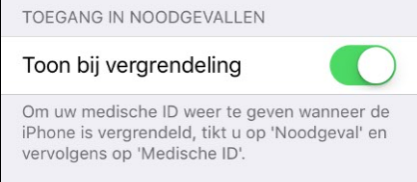
- Scroll down and select >> Add Contact

- Select the contact from your phonebook who should be called in an emergency
- Specify the relationship to this contact, e.g., partner
- Click >> Done
- The contact is now added
What does a responder see in an emergency?
- Your phone is locked

- Responder selects >> Emergency

- Then selects >> * Medical ID
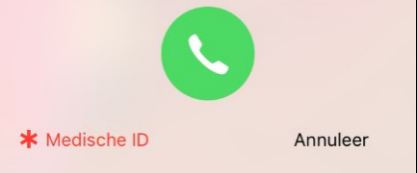
- Calls the contact you set up
Available from iOS8
The Health app is only available on iPhone 4s, 5, 5s, 6, 6 Plus. iOS8 or later must also be installed.