
Excel 2007 Formula: SUMIF
The SUMIF formula is used to calculate a total from one column, but only if a condition in another column is met.
Excel formulas: SUMIF – Add based on condition
As with all Excel formulas, the best way to explain how it works is through an example.
Sample file
A sample file is available for this topic.
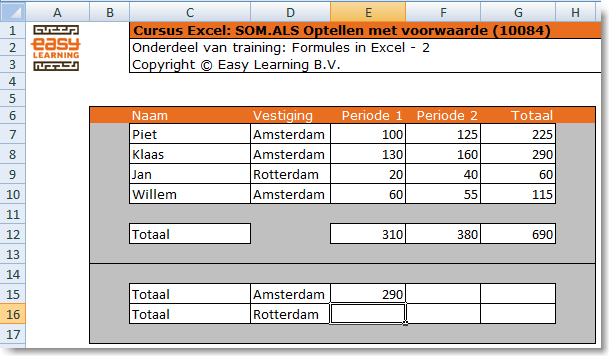
The sample contains four rows of data. It shows the stock of notepads per person. To find out how many notepads are available per location, a summation must be made.
What not to do
Avoid using formulas in the totals that add individual cells together. A formula like =G7+G8+G10 may work for now, but as soon as a row is added, the result becomes unreliable.
What to do
Use the SUMIF formula. This formula adds up values based on a condition. When defining the ranges, also include an extra empty row. This ensures that if new data is added, the total range still includes all relevant cells.
Explaining the formula
In this example, you could calculate Amsterdam’s total using =G7+G8+G10. For Rotterdam, it’s even simpler, just one cell. But if there are not 4 rows, but 4,000, this approach doesn’t work anymore. That’s where the Excel formula “SUMIF” becomes very useful.
The formula for Amsterdam
In this case, use the formula =SUMIF(D7:D11,”Amsterdam”,G7:G11). This means: if the value in D7 through D11 is “Amsterdam”, then sum the corresponding value in the same row from G7 through G11.
Breaking down the formula:
- = → indicates the start of a formula
- SUMIF → indicates the formula being used
- ( → signals the beginning of the function arguments
- D7:D11 → the range where the condition will be checked
- , → separates the function arguments
- “Amsterdam” → the condition to look for
- , → separates the next argument
- G7:G11 → the range to be summed if the condition is met