
Adjust the Number of Recently Opened Files in Excel
Never Search for Files Again
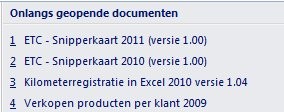
The number of Excel files a user typically works with is usually limited to about 10. Under >> Recent Documents, Excel shows only a limited number by default. However, you can change how many recently opened Excel files appear in the list. By increasing it to the maximum of 50, you can avoid having to search for your files.
Steps to Adjust This Setting
- Click the >> Office Button

- Select >> Excel Options

- Go to the Advanced tab

- Scroll to the Display section on the right side of the screen
- Adjust the setting for >> Show this number of Recent Documents to the desired value. The maximum allowed is 50
