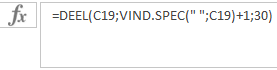
Formula using the MID function
When you want to use a portion of the text from another cell, use the MID function in your formula. Here’s how it works.
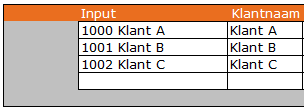
In the input column, there’s a text containing a customer number and a customer name. I only want to extract the name, for example, to send out a mailing.
The formula explained
In our example, we want to display only the customer name in cell D7 using the data from cell C7.
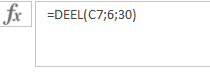
Explanation
To make this Excel formula understandable for everyone, each part is explained. If you’re more experienced with Excel, you can skip this explanation and jump directly to the example file showing how the formula works.
The formula
In cell D7, the formula is: =MID(C7,6,30)
| Element | Explanation |
| = | Indicates the start of a formula in a cell. |
| MID | The function used to extract part of the text from another cell. |
| ( | Starts the function arguments. |
| C7 | The source cell from which we want to extract text. |
| , | Separates arguments in the formula. |
| 6 | The position to start extracting text. |
| , | Separates the next argument. |
| 30 | The number of characters to extract from the start position. |
| ) | Closes the list of arguments. |
When is this formula useful?
This formula is useful when the data structure is consistent. In this example, the customer number is always the same length, so we can hardcode the start position.
When is this formula not useful?
If the data isn’t consistently formatted, the MID function alone won’t work. In that case, you can determine the start position using the position of a space, which is explained in another module.
For advanced users
If the customer numbers are of variable length, the start position of the name changes too. In this case, replace the hardcoded position with the position of the space.
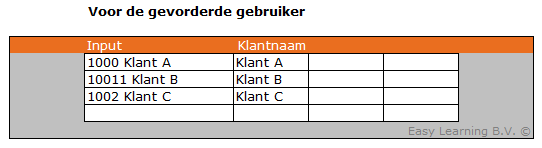
In short: replace the number 6 in the formula with another formula.
The formula to find a space is: FIND(” “,C19), which searches for the first space in cell C19.
The complete formula becomes:
- =MID(C19,FIND(” “,C19)+1,30)