
Import Olympic Games schedule to Outlook mobile
Make sure you don’t schedule appointments when the Dutch athletes are competing in the Olympic Games. You can import all matches involving Dutch athletes into your Outlook calendar.
By synchronizing your Outlook calendar with your phone, you can avoid double bookings and catch our fellow countrymen going for gold.
Download the tool
- Download the import file, save it on your computer and follow the instructions below.
Instructions
- Open Microsoft Outlook >> Calendar

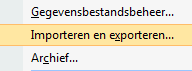
- In the menu, go to >> File >> Import and Export
- Select the option >> Import from another program or file
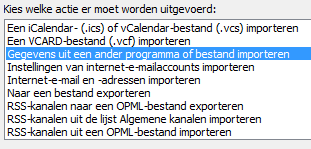
- Then click >> Next

- Choose >> Microsoft Excel. This is listed at the bottom of the selection screen and may not be visible immediately. Scroll down to find it.
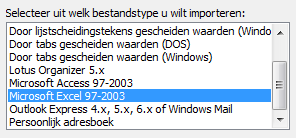
- Click >> Next
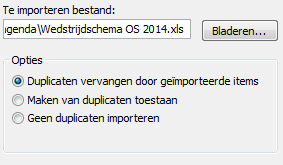
- Select the file you saved earlier and click >> OK
- Choose >> Replace duplicates with items imported
- Click >> Next
- Select your calendar folder

- Click >> Next
- In the “Import a File” window, click >> Finish

- Outlook will begin importing the matches into your calendar