
Print Excel to PDF
When sending data from Excel, it’s best to send it as a PDF.
This ensures that the recipient sees exactly what you intended.
How to Save an Excel File as a PDF
- Select >> File

- Then choose >> Save As

- In the >> Save as type field, Excel format is selected by default
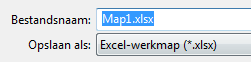
- Click the dropdown arrow on the right to select a different file type

- Select >> PDF (*.pdf)

- Click >> Save
- Always check the PDF before sending it to make sure everything has been exported correctly and that no extra worksheets are included.
When It’s Useful
Use this method when you need the PDF for purposes other than email, for example when uploading to a website.
When It’s Not Useful
If the Excel sheet needs to be emailed directly as a PDF, you can send it right away. In that case, saving it first is not practical.