
Turn off game invitations (PC)
Game invitations on Facebook can be very annoying. Stop being bothered and set your preferences so you no longer receive invitations.
This procedure describes the settings for Facebook on your computer. In Facebook on your computer, you can block the following:
- Block notifications from a specific app
- Block notifications from a specific person
Procedure: block notifications from a specific app
- Log in to >> Facebook
- Click the triangle in the top-right corner

- Select >> Settings

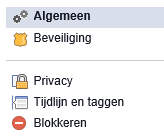
- The settings page opens and shows a menu on the left-hand side
- Select >> Blocking
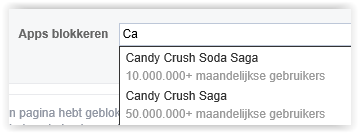
- Go to the section “Block apps” and enter the apps for the games you no longer want to receive invitations from, such as Candy Crush Saga
Block invitations from a specific person
- Log in to >> Facebook
- Click the triangle in the top-right corner
- Select >> Settings
- The settings page opens and shows a menu on the left-hand side
- Select >> Blocking
- Go to the section >> Block app invites
- Enter the name of the “friend“

Turn off game invitations on iPhone
Do you want to turn off game invitations on your iPhone? Use the following instructions: